Top 50 Tableau Interview Questions You Must Prepare In 2021

Beginners Level Tableau Interview Questions
1. What is the difference between Traditional BI Tools and Tableau?
| Traditional BI Tools | Tableau |
| 1. Architecture has hardware limitations. | 1. Do not have dependencies. |
| 2. Based on a complex set of technologies. | 2. Based on Associative Search which makes it dynamic and fast |
| 3. Do not support in-memory, multi-thread, multi-core computing. | 3. Supports in memory when used with advanced technologies. |
| 4. Has a predefined view of data. | 4. Uses predictive analysis for various business operations. |
2. What is Tableau?
- Tableau is a business intelligence software.
- It allows anyone to connect to the respective data.
- Visualizes and creates interactive, shareable dashboards.Read More Tableau Online Training

3. What are the different Tableau Products and what is the latest version of Tableau?
Here is the Tableau Product family.
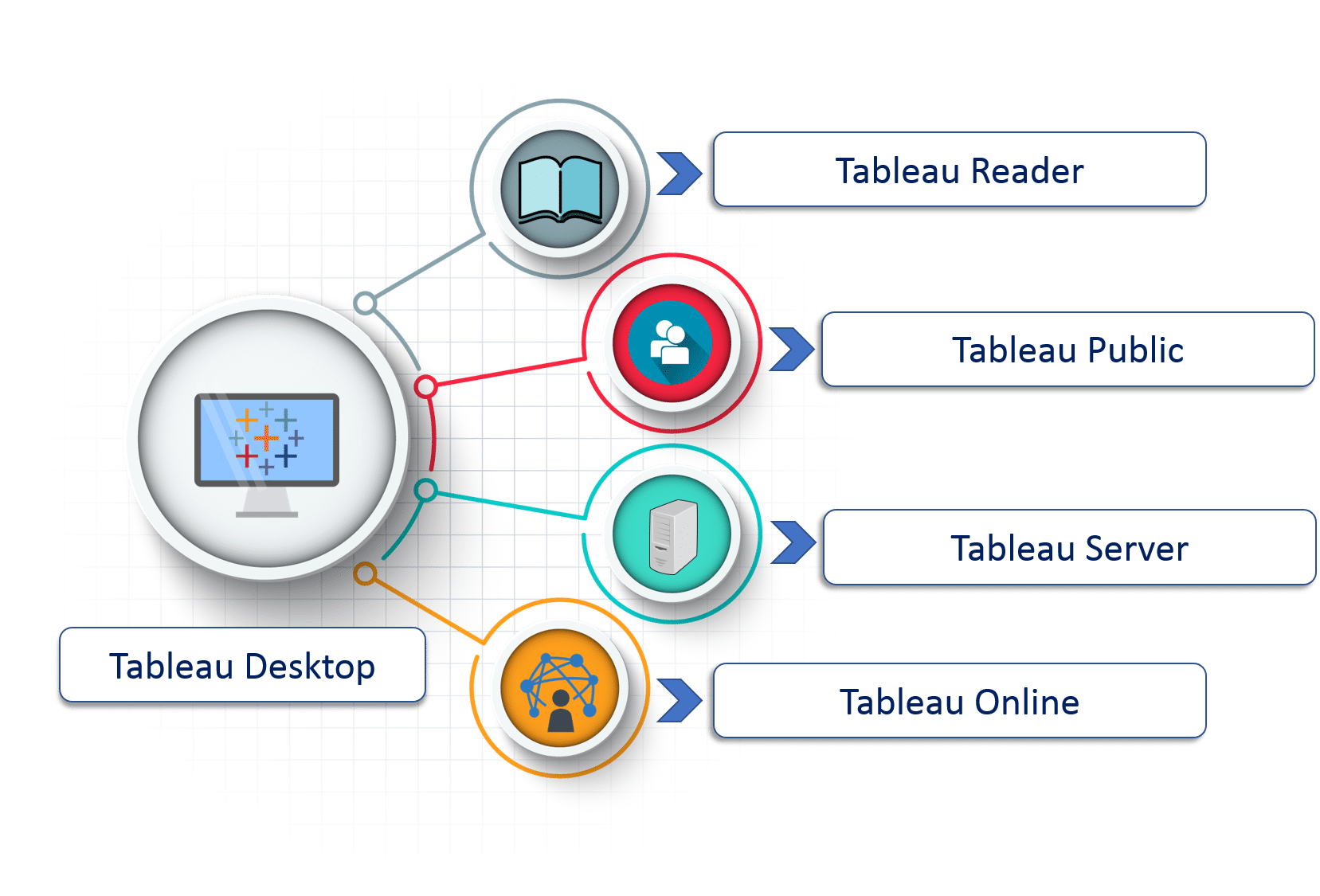 (i)Tableau Desktop:
It is a self service business analytics and data visualization that anyone can use. It translates pictures of data into optimized queries. With tableau desktop, you can directly connect to data from your data warehouse for live upto date data analysis. You can also perform queries without writing a single line of code. Import all your data into Tableau’s data engine from multiple sources & integrate altogether by combining multiple views in a interactive dashboard.Know More Tableau Online Course
(ii)Tableau Server:
It is more of an enterprise level Tableau software. You can publish dashboards with Tableau Desktop and share them throughout the organization with web-based Tableau server. It leverages fast databases through live connections.
(iii)Tableau Online:
This is a hosted version of Tableau server which helps makes business intelligence faster and easier than before. You can publish Tableau dashboards with Tableau Desktop and share them with colleagues.
(iv)Tableau Reader:
It’s a free desktop application that enables you to open and view visualizations that are built in Tableau Desktop. You can filter, drill down data but you cannot edit or perform any kind of interactions.
(v)Tableau Public:
This is a free Tableau software which you can use to make visualizations with but you need to save your workbook or worksheets in the Tableau Server which can be viewed by anyone.Read More Tableau Training
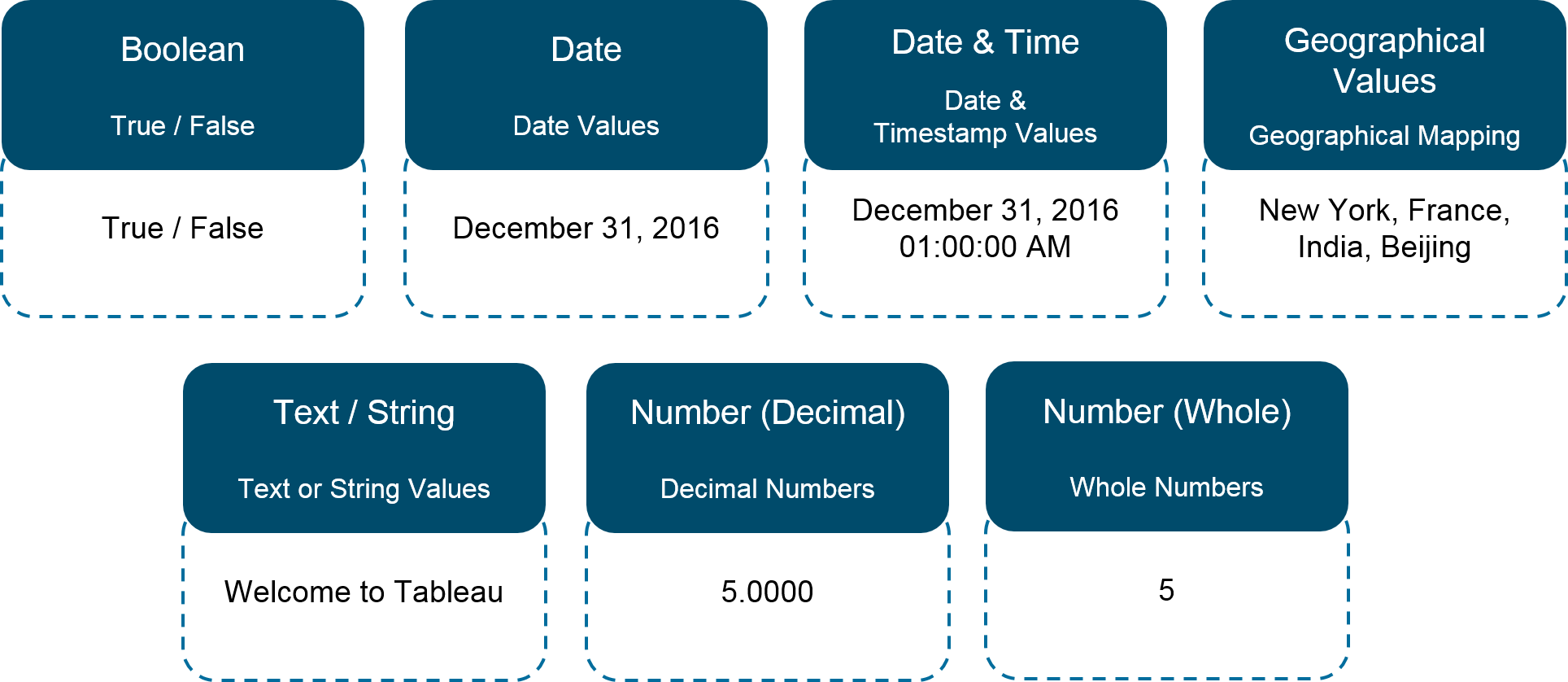
4. What are the different datatypes in Tableau?
Tableau supports the following data-types:
5. What are Measures and Dimensions?
Measures are the numeric metrics or measurable quantities of the data, which can be analyzed by dimension table. Measures are stored in a table that contain foreign keys referring uniquely to the associated dimension tables. The table supports data storage at atomic level and thus, allows more number of records to be inserted at one time. For instance, a Sales table can have product key, customer key, promotion key, items sold, referring to a specific event.Know More Tableau Online Training
Dimensions are the descriptive attribute values for multiple dimensions of each attribute, defining multiple characteristics. A dimension table ,having reference of a product key form the table, can consist of product name, product type, size, color, description, etc.
6. What is the difference between .twb and .twbx extension?
- A .twb is an xml document which contains all the selections and layout made you have made in your Tableau workbook. It does not contain any data.
- A .twbx is a ‘zipped’ archive containing a .twb and any external files such as extracts and background images.
7. What are the different types of joins in Tableau?
The joins in Tableau are same as SQL joins. Take a look at the diagram below to understand it.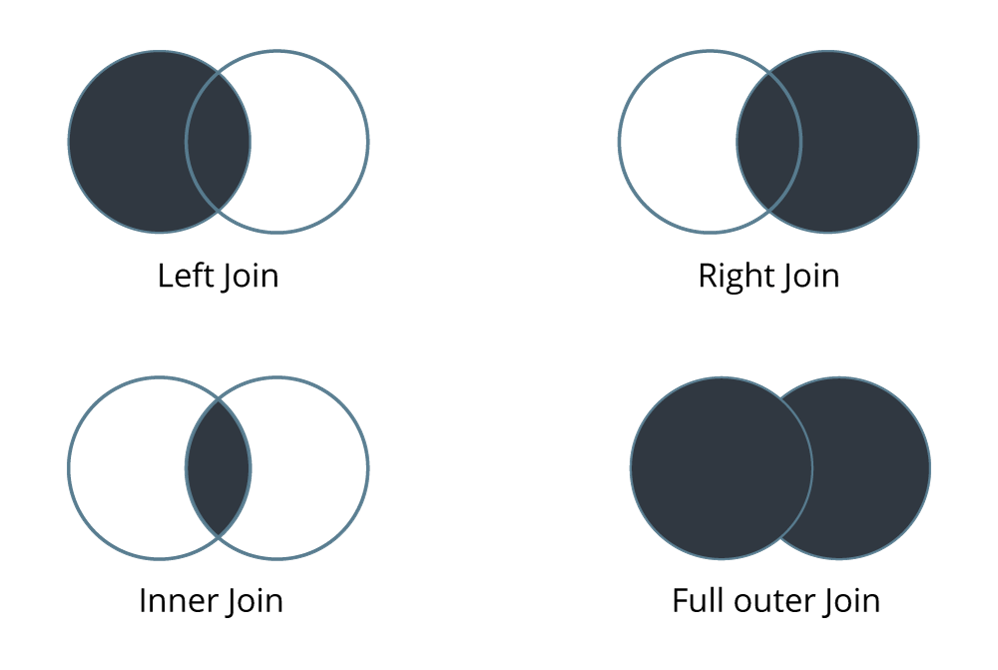
8. How many maximum tables can you join in Tableau?
You can join a maximum of 32 tables in Tableau.Read More Tableau Online Course
9. What are the different connections you can make with your dataset?
We can either connect live to our data set or extract data onto Tableau.
- Live: Connecting live to a data set leverages its computational processing and storage. New queries will go to the database and will be reflected as new or updated within the data.
- Extract: An extract will make a static snapshot of the data to be used by Tableau’s data engine. The snapshot of the data can be refreshed on a recurring schedule as a whole or incrementally append data. One way to set up these schedules is via the Tableau server.
The benefit of Tableau extract over live connection is that extract can be used anywhere without any connection and you can build your own visualization without connecting to database.
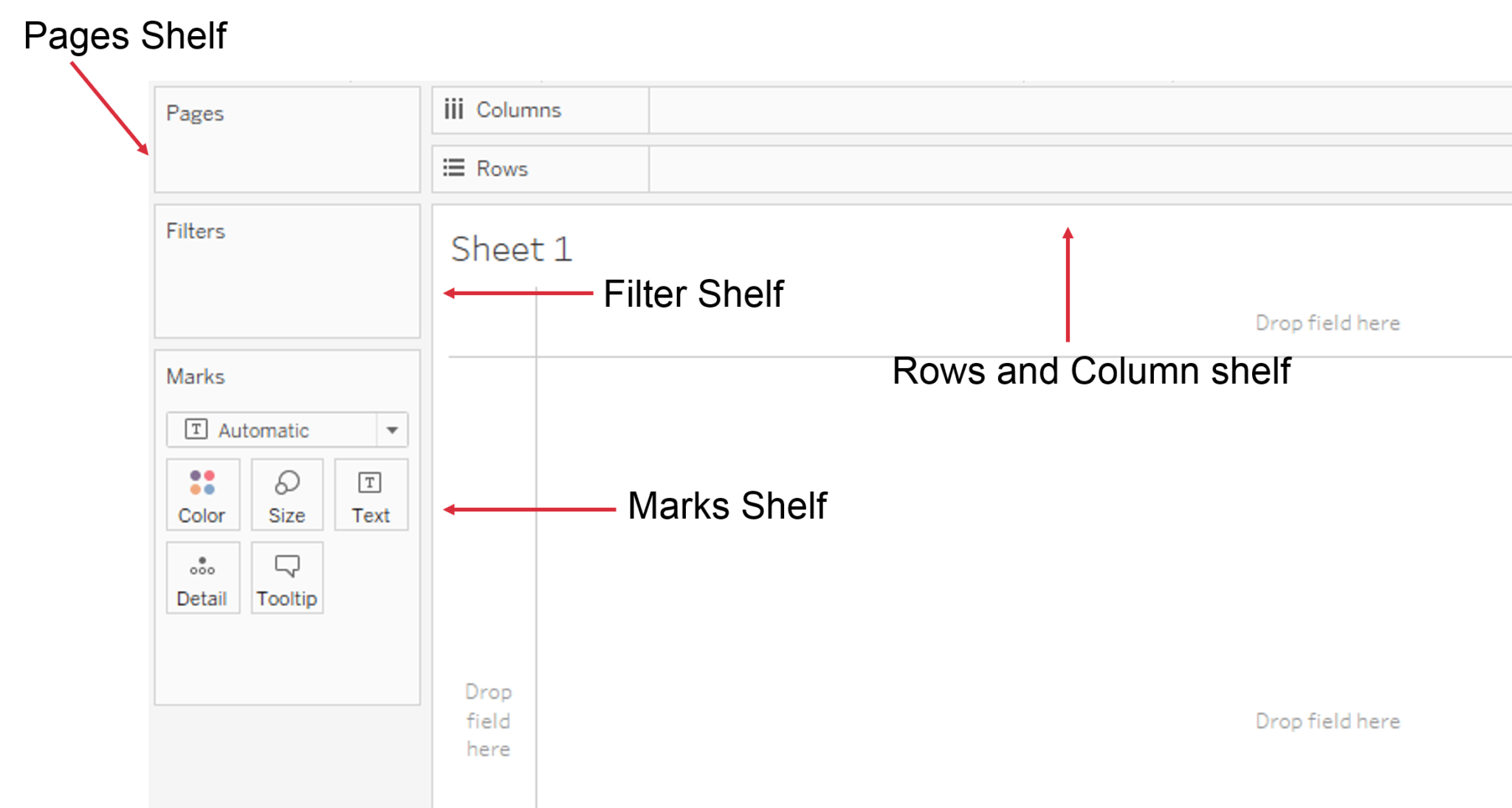
10. What are shelves?
They are Named areas to the left and top of the view. You build views by placing fields onto the shelves. Some shelves are available only when you select certain mark types.
11. What are sets?
Sets are custom fields that define a subset of data based on some conditions. A set can be based on a computed condition, for example, a set may contain customers with sales over a certain threshold. Computed sets update as your data changes. Alternatively, a set can be based on specific data point in your view.Know More Tableau Training
12. What are groups?
A group is a combination of dimension members that make higher level categories. For example, if you are working with a view that shows average test scores by major, you may want to group certain majors together to create major categories.
13. What is a hierarchical field?
A hierarchical field in tableau is used for drilling down data. It means viewing your data in a more granular level.Read More Tableau Online Training
14. What is Tableau Data Server?
Tableau server acts a middle man between Tableau users and the data. Tableau Data Server allows you to upload and share data extracts, preserve database connections, as well as reuse calculations and field metadata. This means any changes you make to the data-set, calculated fields, parameters, aliases, or definitions, can be saved and shared with others, allowing for a secure, centrally managed and standardized dataset. Additionally, you can leverage your server’s resources to run queries on extracts without having to first transfer them to your local machine.
15. What is Tableau Data Engine?
Tableau Data Engine is a really cool feature in Tableau. Its an analytical database designed to achieve instant query response, predictive performance, integrate seamlessly into existing data infrastructure and is not limited to load entire data sets into memory.
If you work with a large amount of data, it does takes some time to import, create indexes and sort data but after that everything speeds up. Tableau Data Engine is not really in-memory technology. The data is stored in disk after it is imported and the RAM is hardly utilized. Know More Tableau Online Course


Thank you for sharing an amazing & wonderful blog. This content is very useful, informative and valuable in order to enhance knowledge. Keep sharing this type of content with us & keep updating us with new blogs. Apart from this, if anyone who wants to join the Tableau Training institute in Delhi, can contact 9311002620 or visit our website-
ReplyDeletehttps://htsindia.com/Courses/business-analytics/tableautraining